Clipveil app icon

Screenshots that are
safe to share.

Capture, annotate and redact in seconds — then paste into Slack, Jira or email without leaking emails, tokens or customer data. Native, fast, and 100% on your Mac.

Launching soon · macOS 14 Sonoma or later · Apple silicon & Intel · 14-day Pro trial, no account needed

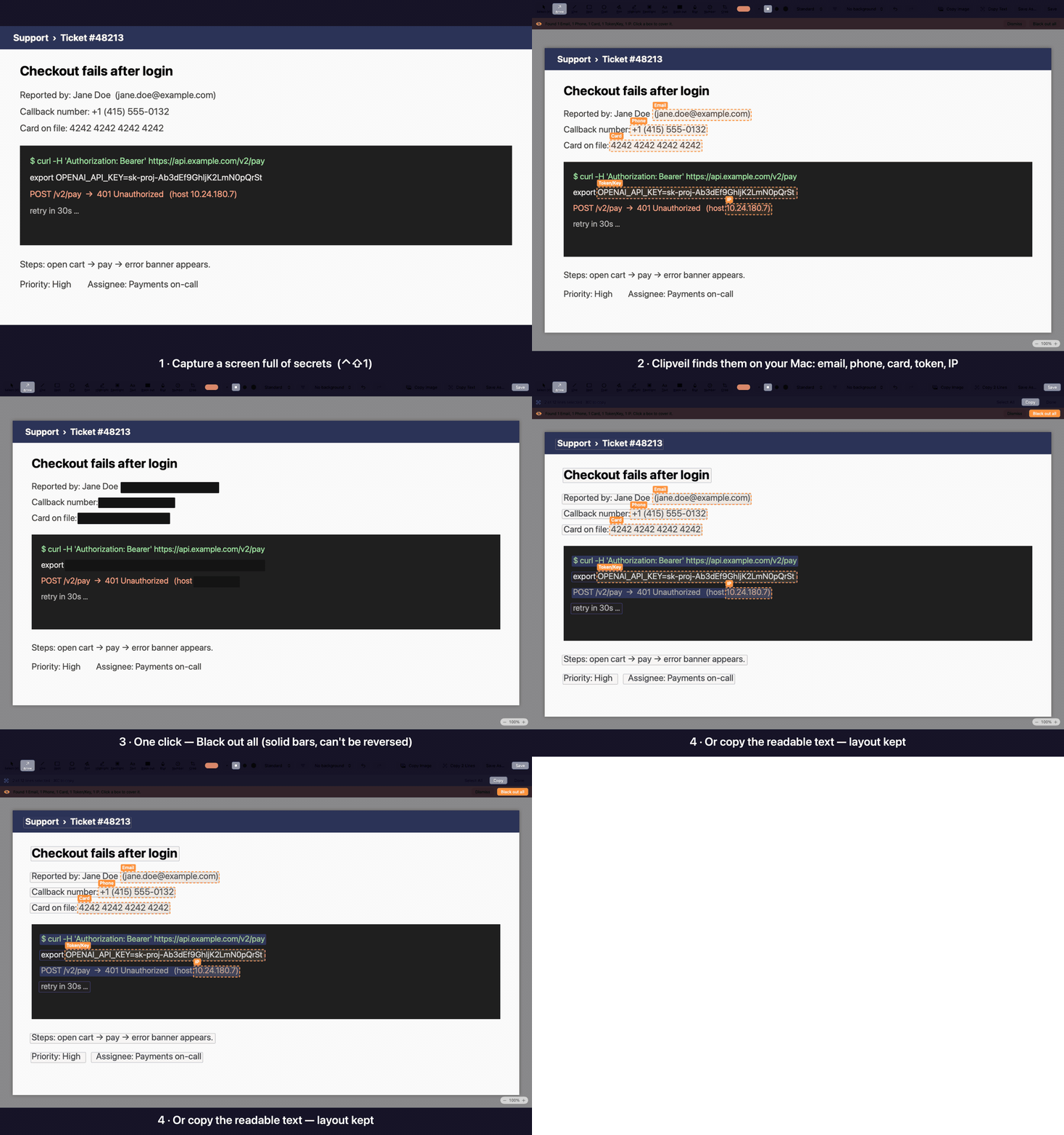
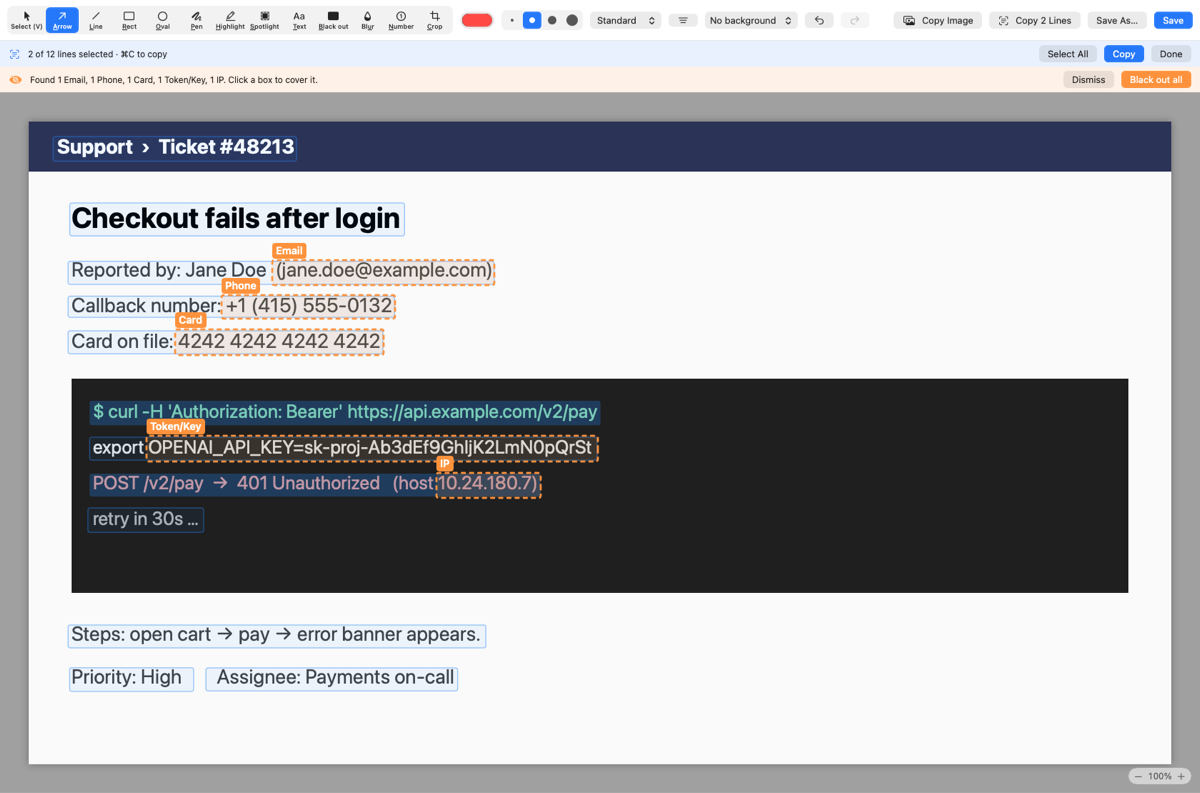
Demo: Clipveil captures a support ticket, outlines the email, phone number, card number, API key and IP address it found, blacks them all out with one click, then copies the remaining text

All data in the demo is made up.

Everything you need. Nothing you don’t.

A focused screenshot tool for people who share screenshots at work.

🎯

Area, window, fullscreen

Global shortcuts, freeze-screen selection and a pixel magnifier. Re-capture the previous area in one key.

🫥

Finds secrets for you

Emails, phone numbers, card numbers, API keys and faces are spotted on-device the moment you capture. One click covers them with solid bars.

✏️

Annotate fast

Arrows, shapes, text, highlights and numbered steps. Move, restyle and undo everything.

📜

Scrolling capture

Capture a whole page or chat into one tall image. Sticky headers don’t repeat.

🔤

Copy text from anything

On-device OCR turns any part of your screen into text on your clipboard.

🎬

Record MP4 & GIF (Pro)

Record a region of your screen and drop it straight into a bug report.

📌

Pin & history (Pro)

Float a screenshot above your work, and reopen recent captures any time.

🔒

Private by design

No account, no cloud, no tracking. Your screenshots never leave your Mac.
See it in action

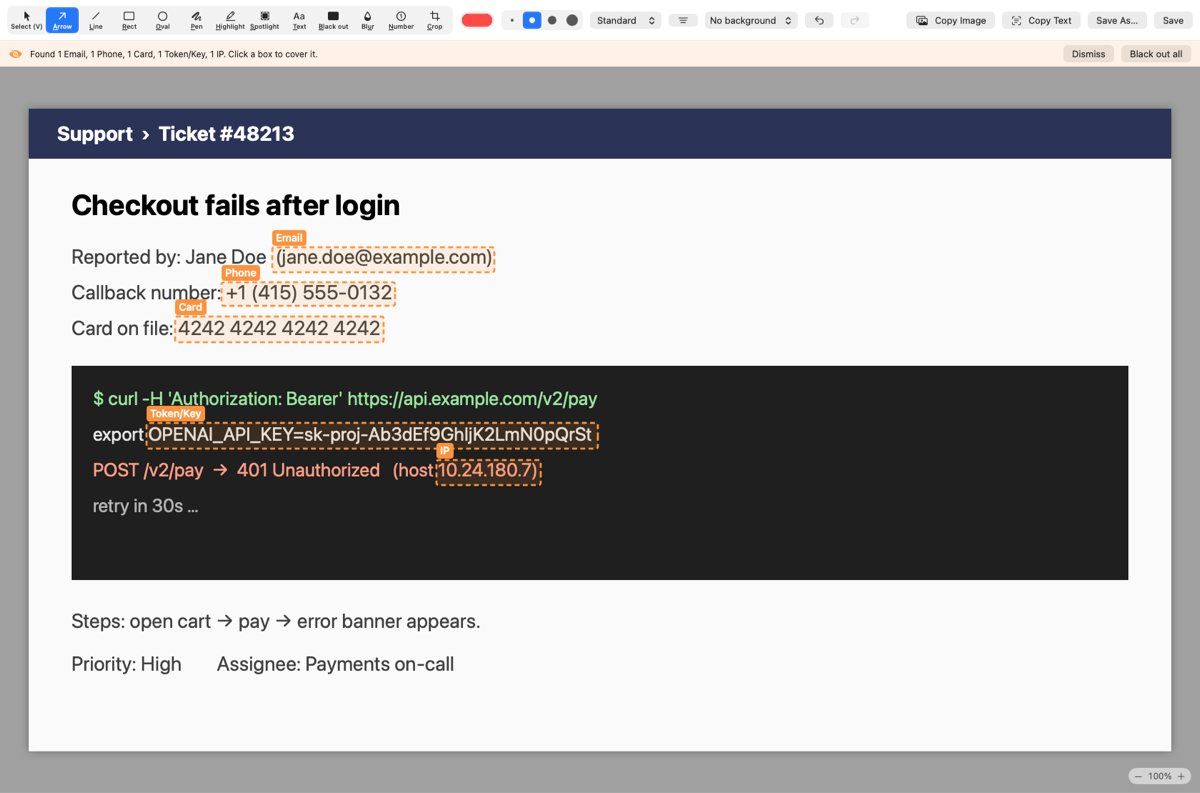
Real screenshots of the editor. Secrets are flagged in orange; one click covers them with solid bars.

Editor right after a capture: five secrets outlined in orange with labels, and a banner offering Black out all
Found on capture. Email, phone, card, API key and IP, each labelled.
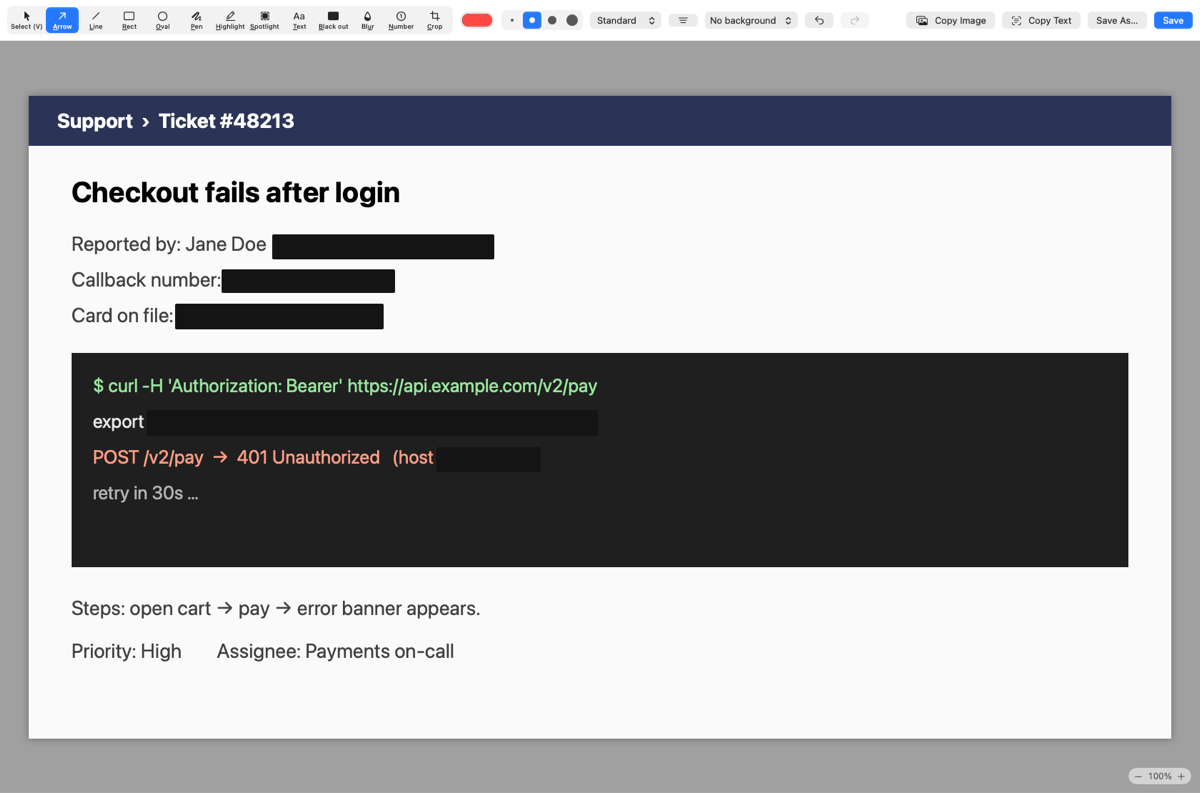
The same capture after Black out all: the secrets are covered by solid black bars, everything else is readable
Black out all. Solid bars — pixelated text can be reversed, these can't.

Faces and text: you decide

Clipveil points things out. Nothing is hidden or copied until you say so.

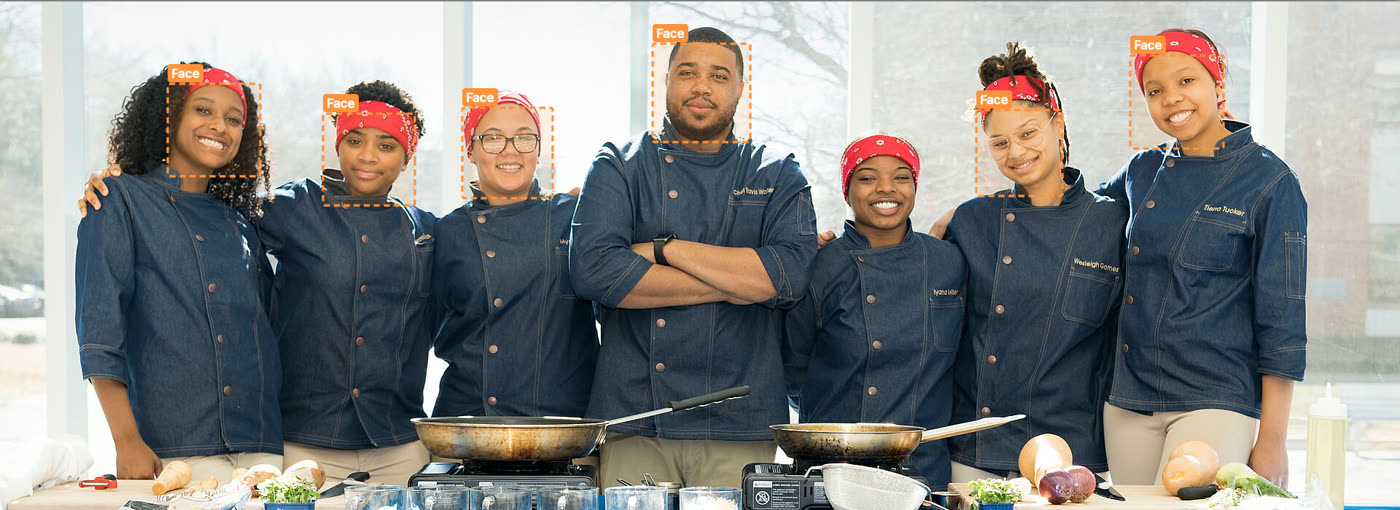
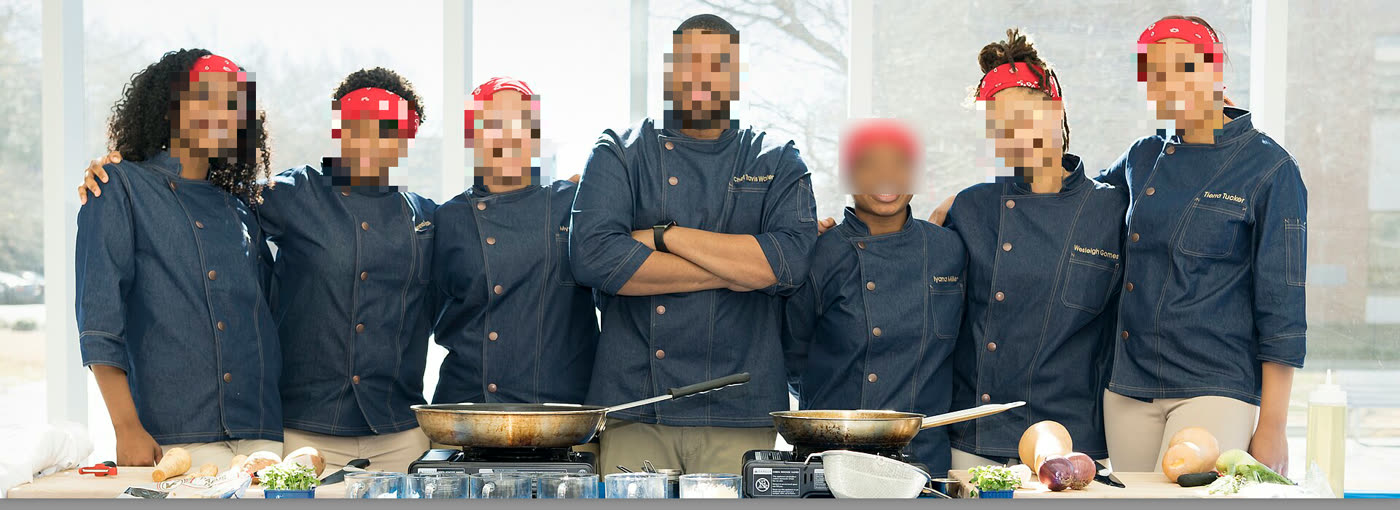
A team photo in the Clipveil editor: six faces outlined in orange with a Face label, none hidden yet
Found — outlined, nothing hidden yet
The same photo with every face covered by a mosaic
After “Black out all” — faces mosaicked

Faces are found, never hidden by surprise

Every face Clipveil finds gets an orange outline — it never hides anyone without asking. Click the ones that shouldn't be shared, or hit Black out all. Missed one? Draw a mosaic over it in a second. Prefer hands-off? Automatic mode covers faces as you capture.

Editor in text mode: every recognised line outlined, two lines selected, a Copy 2 Lines button

Copy the words, not the pixels

Double-click any line of text in a screenshot and press ⌘C. Line breaks and columns are kept, so tables paste straight into a spreadsheet. ⌃⇧4 grabs text from anywhere on screen — no screenshot needed. Recognition runs on your Mac.

Simple yet powerful editor

Everything you need to explain a screenshot, nothing you have to learn.

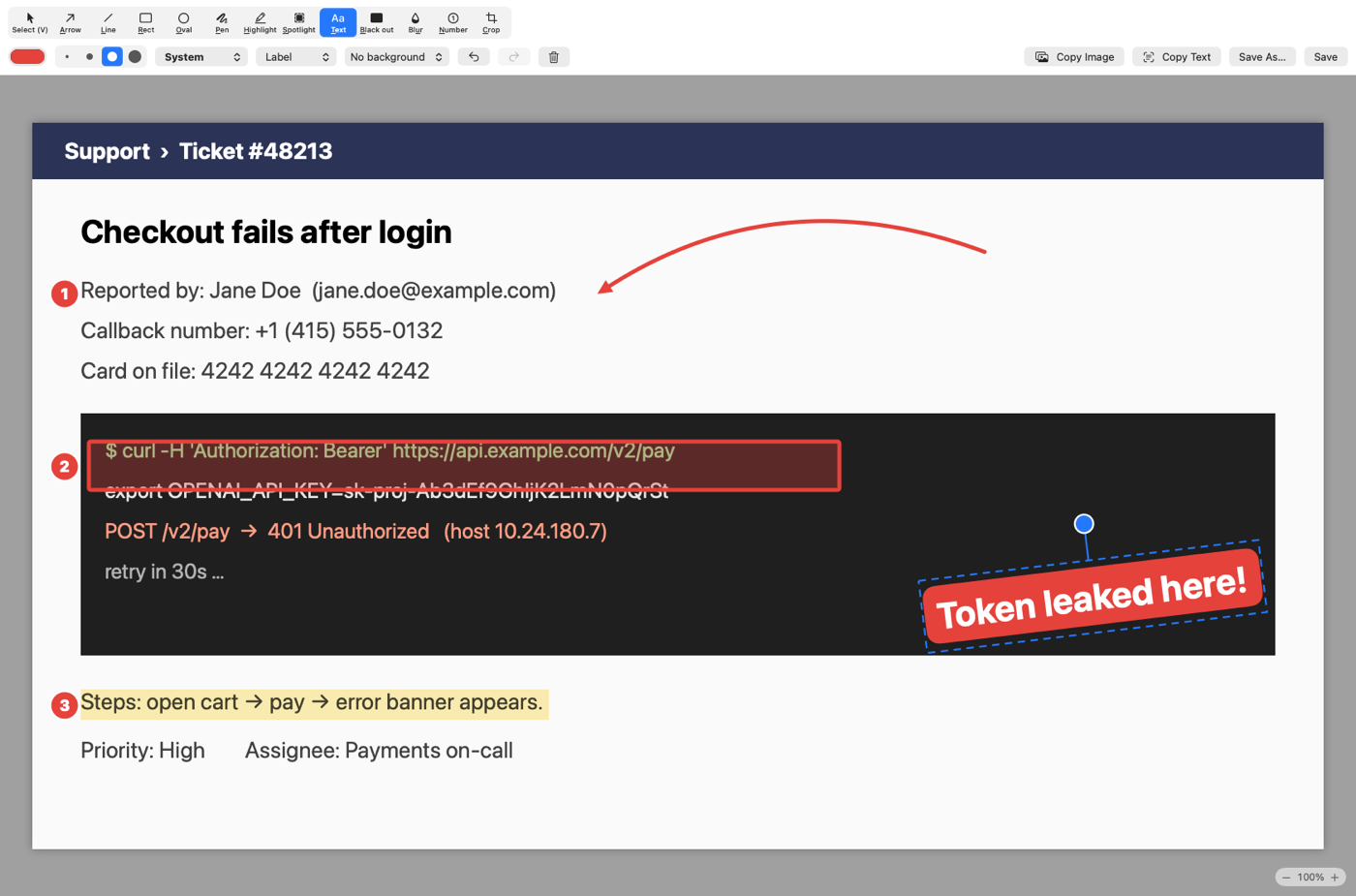
The Clipveil editor: a curved red arrow pointing at an email, numbered steps 1 to 3, a translucent red box over a log line, a yellow highlight over a line of text, and a tilted red label reading Token leaked here with its rotation handle
  • Arrows — straight, bold, curved or double-headed; dashed if you like.
  • Rotate anything — grab the knob above a box, label or mosaic and turn it; it snaps to 45°.
  • Numbered steps — 1, 2, 3… or A, B, C… that renumber themselves.
  • Highlight & spotlight — mark a line, or dim everything except the part that matters.
  • Shapes & text — boxes and ovals with outline, translucent or solid fill; text in five fonts with an outline or label style.
  • One key per tool — A for Arrow, T for Text, B for Black out, N for Number. ⌘Z undoes everything, crop included.

Simple pricing

Every download starts with 14 days of Pro. After that, keep the free version forever — or keep Pro with a one-time purchase.

Free

$0
  • Area / window / fullscreen capture
  • Full annotation editor
  • Scrolling capture
  • OCR text capture
  • Copy, save, drag & drop
Get notified

Pro

$9.99 one-time
  • Everything in Free
  • One-click & automatic redaction, Safe Copy
  • Screen recording (MP4 & GIF)
  • Auto-scroll capture
  • Pin screenshots on screen
  • Backgrounds for polished shots
  • Capture history
  • All 1.x updates free · use on 2 Macs
Get notified

FAQ

Do I need an account?

No. Download, grant Screen Recording permission, and start capturing. A license key is only needed for Pro.

Does Clipveil upload my screenshots?

Never. Capturing, OCR and editing all happen on your Mac. The only network request is a license check for Pro.

What happens after the 14-day trial?

Clipveil keeps working as the free version. Pro features show an upgrade prompt.

Can I get a refund?

Yes — full refund within 14 days, no questions asked. See the refund policy.

How many Macs can I use?

A Pro license activates on 2 Macs. You can move it by deactivating from the License window.